When you reply in Gmail, the quoted original message and Gmail’s one-line reply header can sometimes feel a little hard to read.
The left quote line, extra spacing, and Gmail-style header are useful, but they may not be ideal if you are used to Outlook-style reply formatting or cleaner business email replies.
That is why I built SmartRe for Gmail™, a Chrome extension that formats quoted reply content and original-message headers in Gmail reply drafts.
💡 What SmartRe for Gmail Does
SmartRe for Gmail automatically formats quoted content and original-message headers when you reply in Gmail.
It focuses on two things.
1. Clean up quoted content
Gmail replies usually include the original message as quoted content, with a visible left quote line and extra spacing.
SmartRe for Gmail keeps the quote structure intact as much as possible, but adjusts the visual style to make the reply easier to read.
In rich text replies, it removes the visible left quote line and extra spacing.
In Gmail plain text mode, it removes leading quote markers from quoted lines.
The goal is not to break Gmail’s quote structure, but to make the quoted section look cleaner.
2. Rewrite the reply header in an Outlook-style format
Gmail normally inserts a one-line reply header like this:
Apr 26, 2026, 10:15 Alex Example <alex@example.com>:
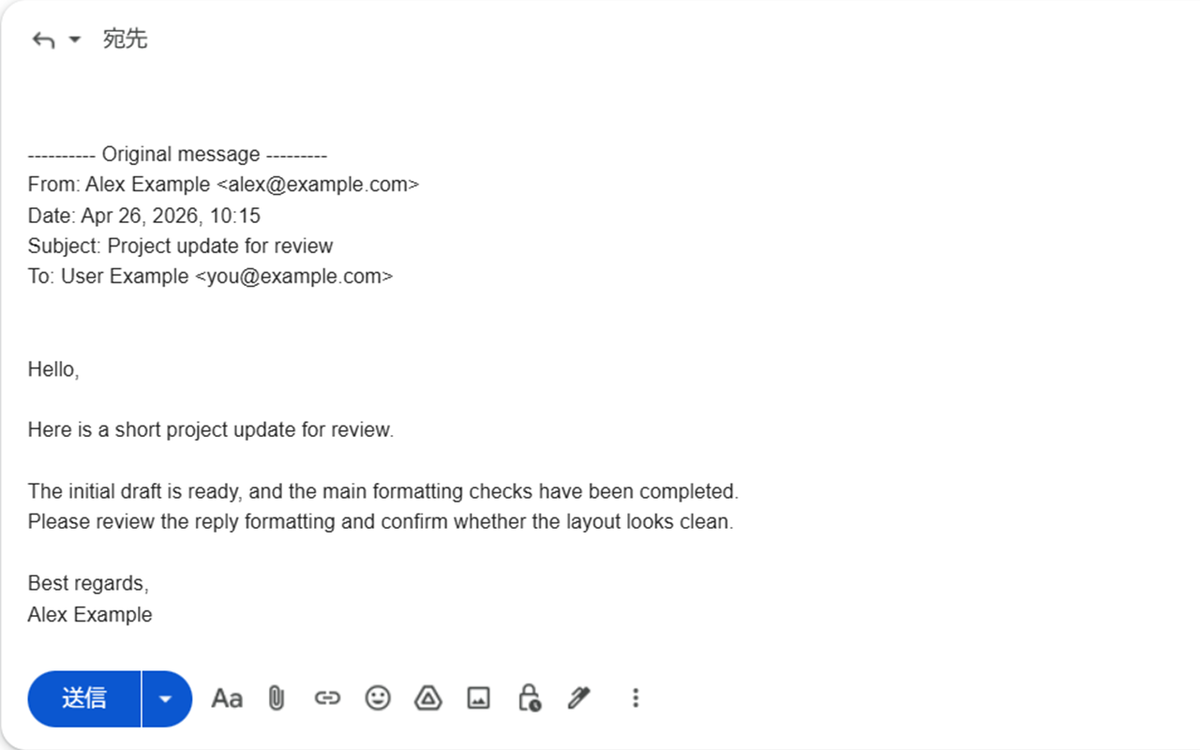
SmartRe for Gmail can rewrite it into a more readable multi-line format:
---------- Original message ---------
From: Alex Example <alex@example.com>
Date: Apr 26, 2026, 10:15
Subject: Project update for review
To: User Example <you@example.com>
If you are used to Outlook or other desktop email clients, this format may feel more familiar and easier to scan.
💭 Why I Created It
I have previously built a Thunderbird add-on for reply formatting and a Chrome extension called SmartURLs.
But when using Gmail, I still found myself wanting cleaner reply formatting.
Gmail’s conversation view already keeps the message thread, so the quoted original message does not always need to stand out so strongly.
In business email, it can also be helpful to show the original message information — sender, date, subject, and recipient — in a structured multi-line format.
So I decided to build a small Chrome extension focused only on Gmail reply formatting.
What I wanted was:
- ✨ Automatic formatting when replying
- 📩 Quote structure preserved as much as possible
- 📧 Readable Outlook-style original-message headers
- 🛡️ Local processing inside the browser
- 🌐 Open-source implementation
🎨 Simple Settings
SmartRe for Gmail keeps its settings simple.
There are currently two options:
- Adjust quote style
- Rewrite reply header
Both can be turned on or off from the popup.
The extension automatically opens Gmail’s hidden quoted content when you reply, then formats the generated reply content.
⚙️ Key Features
- Clean quoted content in Gmail replies
- Remove the visible left quote line and extra spacing in rich text replies
- Remove leading quote markers in Gmail plain text reply mode
- Rewrite Gmail’s one-line reply header into an Outlook-style format
- Add sender, date, subject, and To lines when they can be detected
- Save settings with Chrome Storage Sync
- English and Japanese support
- Open source under the Apache License 2.0
🔒 Privacy
SmartRe for Gmail runs on the Gmail reply page.
All formatting is performed inside your browser.
The extension does not send Gmail message contents, profile email addresses, account display names, extension settings, or any other user data to the developer’s servers or to third-party services.
The signed-in Chrome profile email address is used only to add the To line when rewriting the reply header.
📦 Installation
Install from the Chrome Web Store:
👉 SmartRe for Gmail
GitHub:
👉 isshiki/SmartRe-for-Gmail
💬 What’s Next
Version 1.0.0 focuses on quote style adjustment and reply header rewriting.
For future versions, I am considering a mode that removes quoted content entirely, as well as custom reply header templates.
SmartRe for Gmail is not a full email management tool.
It is a small extension that makes Gmail replies a little cleaner and easier to read.
If you prefer cleaner quoted replies or Outlook-style original-message headers in Gmail, I hope SmartRe for Gmail will be useful for you.
